

AI Scientific Figure Generator
AI Scientific Figure turns your descriptions, sketches or abstracts into clean, publication-ready scientific figures, graphical abstracts and posters in minutes, with accurate labels and layouts sized for journals, slides and posters.
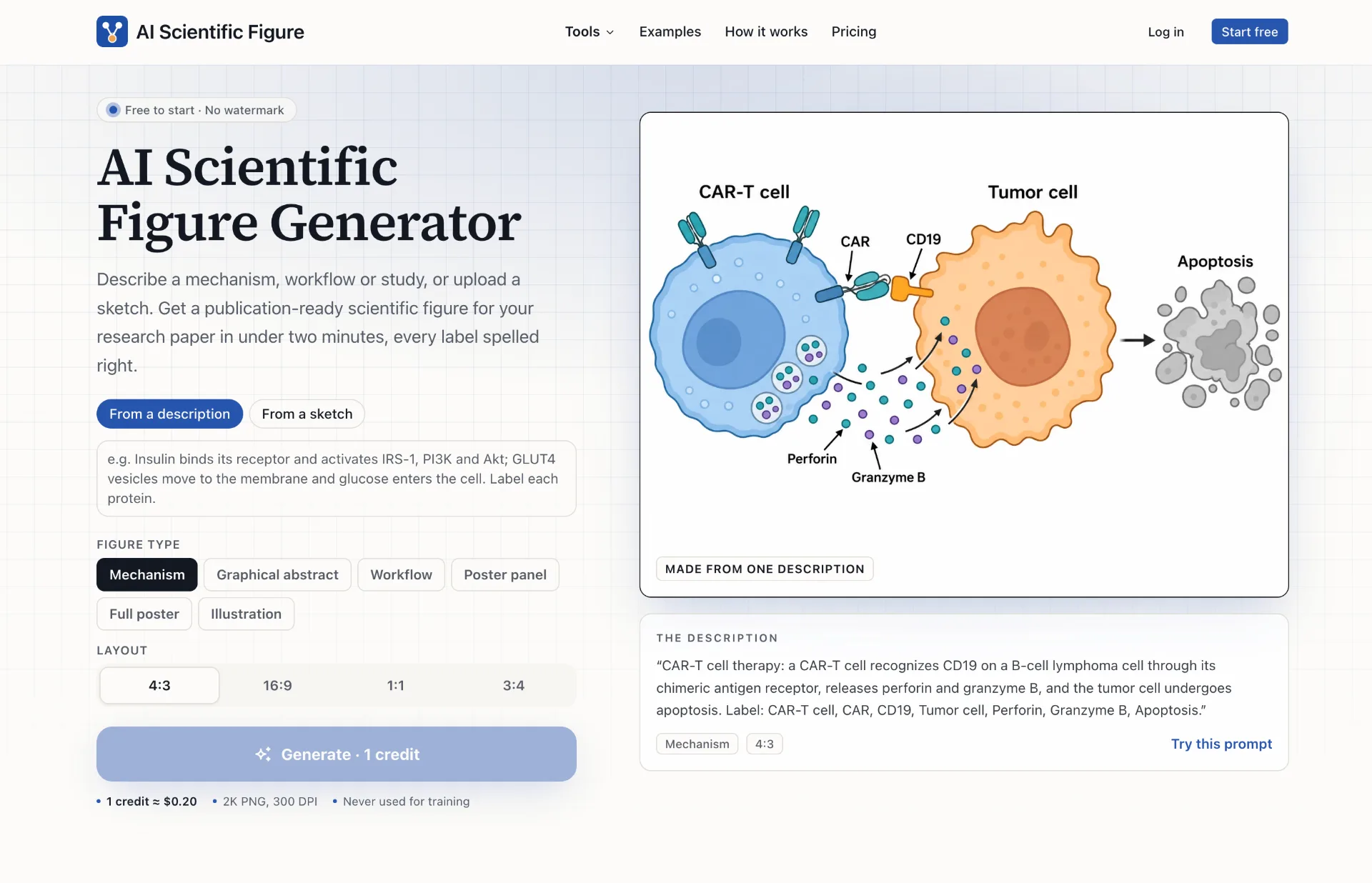
What is AI Scientific Figure
AI Scientific Figure is an AI-powered scientific figure generator that converts textual descriptions, hand-drawn sketches or paper abstracts into clean, publication-ready figures. It focuses on mechanisms, graphical abstracts, workflows, poster panels, full posters and illustrations, producing 2K PNG diagrams with accurate labels, consistent styling and layouts suitable for journal pages, conference posters and presentation slides.
How to use AI Scientific Figure
- Go to the AI Scientific Figure website and create an account or log in with your existing credentials.
- On the main generator interface, choose how you want to start: from a description, a sketch or an abstract.
- If you start from a description, write a clear paragraph describing your mechanism, workflow or study, including:
- The key entities (cells, molecules, devices, patient groups, etc.).
- The actions or relationships (activates, inhibits, converts, flows, etc.).
- The labels you want to appear on the figure.
- If you start from a sketch, upload a photo of your notebook drawing, whiteboard capture or older figure; the tool will preserve the layout while redrawing shapes, arrows and text cleanly.
- If you start from an abstract, paste the abstract text and select the “Graphical abstract” figure type so the system can extract the main cause, mechanism and outcome.
- Select the Figure type from the options: Mechanism, Graphical abstract, Workflow, Poster panel, Full poster or Illustration, depending on your study and target journal or conference.
- Choose the Layout ratio (4:3, 16:9, 1:1 or 3:4) to match your manuscript template, slide deck or poster format.
- Refine your description to specify panel letters, arrows, labels, legends, and any axes or units you need for chart-like panels.
- Click the Generate button; one credit will be used for each figure you generate.
- Wait less than two minutes while the model creates your scientific figure based on your input.
- Review the resulting 2K PNG figure; if you want changes, tweak the wording of your description or abstract and generate a new version using another credit.
- Download the final PNG file with 300 DPI resolution and a white background, then insert it into your manuscript, poster template or presentation slide.
- Optionally, open the PNG in your preferred graphics or layout editor to make final manual adjustments, annotations or alignments before submission or printing.
AI Scientific Figure's use case
- Visualizing complex biological mechanisms, such as signaling pathways, cell–cell interactions, immune therapies, or metabolic routes for inclusion in research articles.
- Designing graphical abstracts that summarize cause–mechanism–outcome relationships across disciplines like neuroscience, microbiome research, oncology or metabolism.
- Creating clinical research workflows, such as randomized controlled trial designs, patient screening and randomization diagrams, and follow-up timelines for methods sections.
- Producing poster panels that illustrate experimental pipelines, field sampling schemes, omics workflows or data visualization panels for conference posters.
- Generating materials and engineering illustrations, including device schematics, batteries, reactors, or catalytic cycles with clearly labeled components and steps.
- Redrawing hand-drawn lab notebook sketches into clean, consistent figures suitable for theses, grant applications and high-impact journal submissions.
- Building teaching and presentation figures that explain experimental designs, conceptual frameworks or pathways for lectures, seminars or lab meetings.
- Drafting multi-panel figures with panel letters, legends and axes that match common journal formatting requirements without starting from a blank canvas.
Benefits of AI Scientific Figure
- Drastically reduces figure creation time, generating an initial, publication-ready figure in under two minutes instead of hours spent in vector editors.
- Removes the need for advanced design and drawing skills, allowing researchers to focus on scientific accuracy while the tool handles visual layout and styling.
- Produces study-specific figures directly from your own descriptions, not limited by fixed icon libraries or generic templates.
- Ensures consistent labels and typography, using clean, readable fonts, correct spelling and horizontal orientations suitable for print.
- Automatically converts verbs into arrows and directional flows, translating textual mechanisms into intuitive, visually coherent diagrams.
- Supports panel letters, legends and axes, aligning with the figure conventions used by most scientific journals and conferences.
- Offers multiple figure types and aspect ratios, making it easy to cover mechanisms, graphical abstracts, workflows and posters from the same interface.
- Delivers high-resolution 2K PNGs with 300 DPI at double-column width, suitable for journals, posters and slides without additional upscaling.
- Provides flexible pricing with credits and subscriptions, with credits that never expire in packs and monthly plans that roll over unused figures.
- Maintains privacy of unpublished research, as figures are not reused for training according to the service description.
Pros
- Fast turnaround from text, sketch or abstract to ready-to-use scientific figures.
- No need for expert design skills or manual vector drawing to achieve professional-quality diagrams.
- Supports a wide range of figure types and layouts tailored to typical scientific communication formats.
- High-resolution PNG output aligned with common journal and poster size requirements.
- Flexible credit-based and subscription pricing options that accommodate individuals and labs.
Cons
- Output format is PNG rather than fully editable vector graphics, which may limit deep post-editing.
- Each iteration consumes credits, so extensive trial-and-error may increase usage costs.
- Journal policies on AI-generated figures can vary, requiring authors to check guidelines carefully.
- Custom, highly stylized designs may still require manual work in traditional vector editors.
- Dependence on clear, detailed descriptions means vague or incomplete prompts can lead to suboptimal figures.
让更多人发现你的产品。
提交到 Submito发现更多产品

Panel Font
Panel Font is an AI-powered manga translator that converts manga, manhwa, manhua and images into over 100 languages in your browser, preserving panels, speech bubbles and artwork with smart typesetting and batch processing.

Kling 4.0
Discover Kling 4.0, an AI video generator that turns text prompts or images into 5–30 second HD or 4K scenes with optional audio, perfect for product reveals, social clips, and story development.
TokLab
TokLab lets you call leading AI image, video, LLM and audio models through one API key and base URL, see live prices before every request, and only pay for successful runs with credits that never expire.